
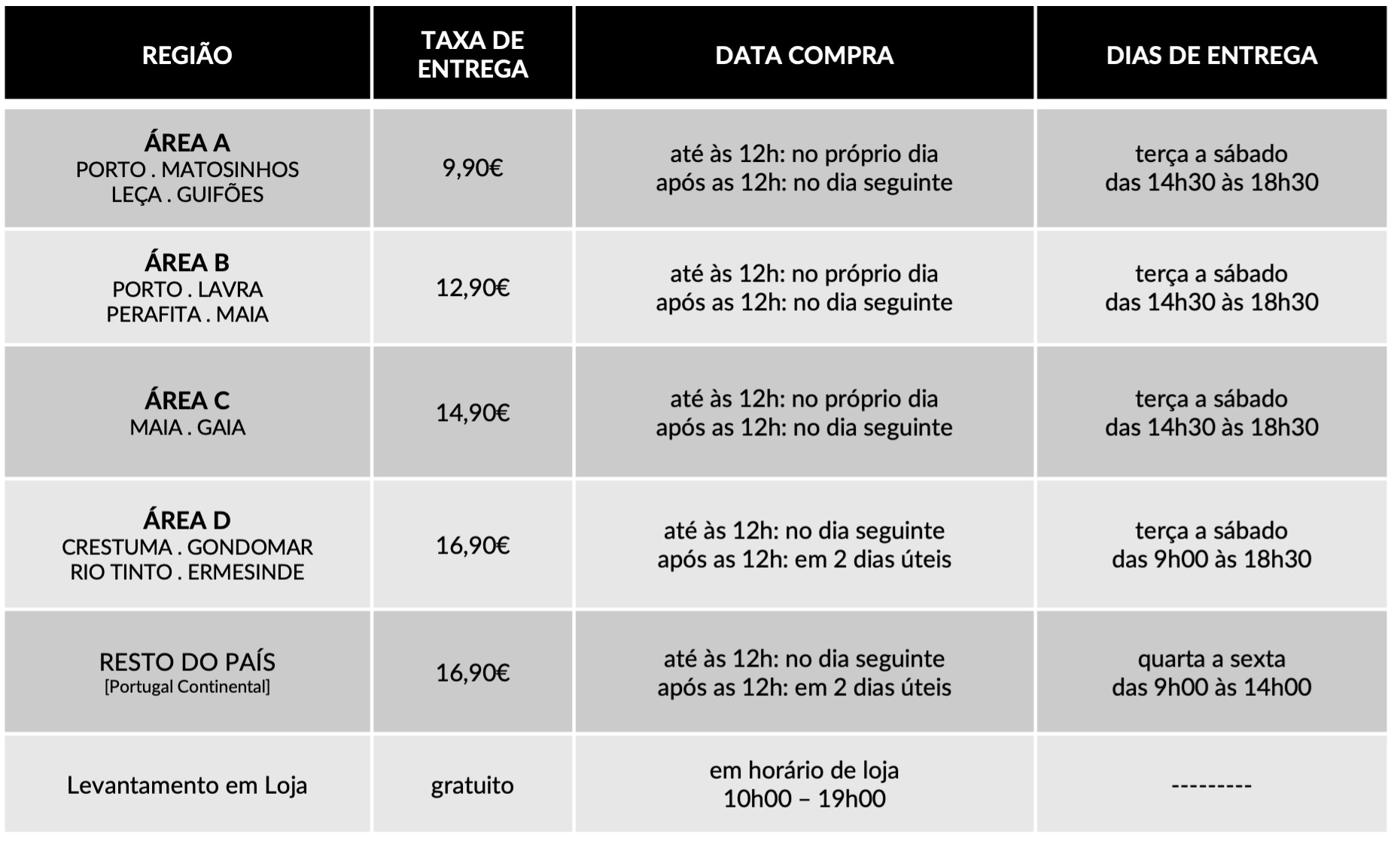
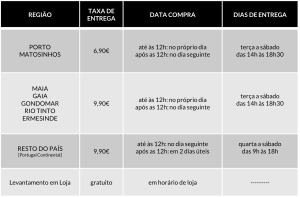
FAQ
Dedicamos toda a atenção na manutenção e preservação das nossas Flores, garantindo que cheguem ao nosso cliente com toda a frescura, qualidade e beleza. Disponibilizamos várias soluções de manutenção e embalamentos adequando sempre a cada necessidade e contexto da entrega.
Pode incluir na sua oferta uma mensagem personalizada que irá ser reproduzida por nós. No processo da compra online basta preencher o campo ”dedicatória” e escrever a mensagem pretendida.
Valorizamos e priorizamos a qualidade dos serviços e dos nossos produtos. Todas as flores disponibilizadas nos ramos e arranjos disponíveis na loja online são frescas e estão em condições de servir o destinatário.
Caso haja alguma insatisfação por parte do cliente, recomendamos que utilize os nossos canais de comunicação para que possamos analisar a questão.
As fotografias são ilustrativas, quer isto dizer que não garantimos a 100% a sua fieldade com a realidade.
As fotografias devem ser interpretadas como uma base de modelo ou de estética onde as alterações estão sujeitas ao stock da flor e ao trabalho humano de cada florista. Note-se que algumas flores são sazonais e não estão disponíveis todo o ano. Como tal, serão necessárias fazer adaptações consoante a época e o stock da flor.
Para casos onde as alterações sejam extremamente notórias, contactaremos o cliente para ajustar a melhor solução.
Não cancelamos nem alteramos encomendas se esta já se encontrar em fase de curso, ou seja, se já tiver saído da loja e em fase de transporte.
Se a encomenda se encontrar no estado inicial, de processo, é possível alterar e cancelar a encomenda e reaver o seu dinheiro.
Caso não havendo outra referência dada pelo utilizador (por exemplo: deixar no porteiro, na loja x, à pessoa y) o utilizador será contactado de imediato para ficar ao corrente da situação e, à falta de alternativas, a encomenda voltará para a Terrárea, Caso seja reagendada uma nova entrega será cobrada novamente taxa de entrega.
Sublinhamos a importância dos dados fornecidos pelo utilizador estarem correctos e claros. Há sempre a possibilidade do utilizador acrescentar um ponto de referência e outras informações para que não hajam quaisquer dúvidas no acto da entrega garantindo, assim, a qualidade do serviço.
Lamentamos mas não podemos facultar essa informação, se o cliente que realizou a encomenda não pretender.
Estamos abertos a alterações embora estas estejam sempre condicionadas pelo tipo de pedido do utilizador, stock em loja e conceito estético. Nestes casos sugerimos o contacto telefónico ou por email.
Queremos satisfazer todos os nossos clientes e oferecer o nosso melhor serviço. Agradecemos, por isso, todas as opiniões e sugestões para podermos encontrar soluções às suas necessidades! Contacte-nos a partir dos seguintes meios: via email info@terrarea.pt ou telefone 223 170 414

How to Sign In to OpenSea, Navigate Polygon Listings, and Avoid the Common Pitfalls
Okay, so check this out—logging into OpenSea feels simple until it isn’t. Wow. At first glance you think: wallet, click, done. But my instinct said somethin’ felt off about that oversimplification. On one hand the UX is straightforward; on the other, the crypto underpinnings throw curveballs that trip up collectors and traders every day.
I started using OpenSea years ago, early enough to remember gas-fee rage and the scramble when Polygon support first landed. Seriously? Fees went from wallet-emptying to basically nothing for many actions. Initially I thought layer-2 solves everything, but then realized user confusion and phishing risks rose in parallel. Actually, wait—let me rephrase that: Polygon helps, but only if you understand how it changes the sign-in and transaction flow.
Here’s the short version: you sign in with a Web3 wallet (MetaMask, Coinbase Wallet, WalletConnect, etc.), approve a signature to authenticate, and then you’re in. But that signature isn’t a password exchange; it’s a cryptographic assertion that you control the wallet address. Hmm… that distinction matters more than most guides make clear. My gut says people skip learning that and pay later (with lost funds or access).
Step-by-step: Signing in to OpenSea (practical, no fluff)
First: pick your wallet. MetaMask is the default for many. Coinbase Wallet and WalletConnect are common too. Second: make sure your wallet is set to the right network — Ethereum mainnet for most collections, Polygon for those minted on that chain. Third: connect and sign the ephemeral message OpenSea presents. That’s it, essentially. But wait—there’s nuance.
When you click “Connect” you’ll get a wallet popup asking for permission. It’s not granting OpenSea access to move funds (unless you explicitly sign a transaction later); it’s granting a signature to authenticate. Short burst. Very important: never sign unknown transactions. If a popup asks to approve spending or to grant approvals for an entire contract, pause. My experience taught me that blanket approvals are the biggest single operational risk.
Also, a practical tip: if you use MetaMask and plan to interact with Polygon, add Polygon to MetaMask first. You can do this manually or use the quick add buttons that some tutorials provide. If you don’t, you’ll be prompted later and that interrupt can be confusing mid-checkout. On rare occasions I had to refresh, reconnect, and re-sign the message twice because network switching hiccuped—annoying, but normal.
OpenSea Marketplace vs. Polygon on OpenSea — what’s different?
OpenSea lists NFTs across chains. Ethereum collections behave differently than Polygon ones. On Ethereum you contend with gas for most on-chain actions; on Polygon many actions are gas-free or very low cost. But there’s a trade-off: Polygon listings may require you to bridge assets or to use a Polygon-enabled wallet address. On one hand you save on fees, though actually you may spend time bridging incorrectly and mess things up.
Here’s what bugs me about bridging guides: they assume you’re comfortable moving crypto between chains. I’m biased, but I think bridging deserves more attention from marketplaces. For now, if you want to buy a Polygon NFT, make sure you have MATIC in your Polygon wallet and that your wallet’s network is switched to Polygon. If you’re following a walkthrough, try the official route and avoid random third-party bridges unless you know them well.
Okay—real-world scenario. You spot a Polygon NFT you love. You click buy. The checkout either asks you to sign a simple signature (for purchases listed at fixed price under OpenSea’s account abstraction flow) or to sign a transaction that spends MATIC. If it’s the latter, your wallet will show gas and a cost. Sometimes marketplaces use “lazy minting” or off-chain orders, which changes what you see. So, trust the wallet popup, not the page copy. If the wallet asks to approve an entire contract to spend your tokens, read it carefully. If it looks odd, step back.
Security fundamentals — common scams and how to avoid them
Phishing is the #1 problem. People get comfy and then click. Really? Yeah. Fake OpenSea pages and malicious links are everywhere. If you ever reach a sign-in flow through a link, double-check the URL. I keep a simple habit: open my wallet extension first, then navigate to OpenSea via a bookmark or typed URL. It adds 10 seconds, but those 10 seconds have saved me from questionable redirects more than once.
Also: never share your seed phrase. Never. Not in chats, not for “support.” OpenSea and wallets will never ask for your seed phrase to sign in. If someone demands it, they want your account. Oh, and be skeptical of social DMs promising “free drops” that require a signature beyond a login—those often attempt approval for token transfers.
Pro tip: use a hardware wallet for larger holdings. It forces physical confirmation for transactions, which blocks most remote approvals. It’s not perfect, but it’s a real barrier. Another thing: limit contract approvals by using spend-limited allowances or revoking approvals from time to time. Tools exist for that; I run them monthly if I’m actively trading.
Practical workflow for collectors who want to use OpenSea + Polygon
Start here: create a wallet (MetaMask or Coinbase). Backup the seed offline. Add the Polygon network to your wallet. Acquire MATIC on an exchange and bridge it, or buy MATIC directly where supported. Fund the wallet. Switch to Polygon when you intend to buy Polygon items. Connect to OpenSea using the wallet’s “Connect” feature. Sign the ephemeral login message. Browse, bid, buy.
That said, there’s friction. Bridging costs, exchange withdrawal delays, and wallet UI quirks can make it feel clunky. I used to dread trying to buy a time-limited drop on Polygon because a slow bridge could cost me the mint. Now I plan ahead. Buy the gas token before the event. simple. (oh, and by the way… keep a tiny buffer for any unexpected fees.)
FAQ — quick, honest answers
How do I sign in to OpenSea safely?
Use a trusted wallet, navigate to OpenSea via a bookmark or typed URL, connect your wallet, and sign the one-time authentication message. Never reveal your seed phrase and never approve blanket spend permissions without thinking it through.
Do I need Ether to use OpenSea?
Not always. For Polygon-listed NFTs you need MATIC on the Polygon network. For Ethereum NFTs, you need ETH. Some actions might be possible without holding native gas if OpenSea supports gasless or account-abstraction flows, but keep expectations realistic—gas is often required for transfers and some listings.
What’s the easiest wallet to start with?
MetaMask is common and widely supported. Coinbase Wallet is also user-friendly. WalletConnect helps connect mobile wallets. Choose what you find comfortable, and test small transactions before committing large amounts.
I’ll be honest: the ecosystem still feels like the Wild West in places. There’s improvement every quarter, but user mental models lag behind the tech. My final nudge—if you’re signing in, double-check the URL and the wallet popup; breathe; sign only what you understand. If you want a straightforward how-to with screenshots, this guide I followed ages ago saved me from a phishing trap: https://sites.google.com/cryptowalletuk.com/opensea-login/