
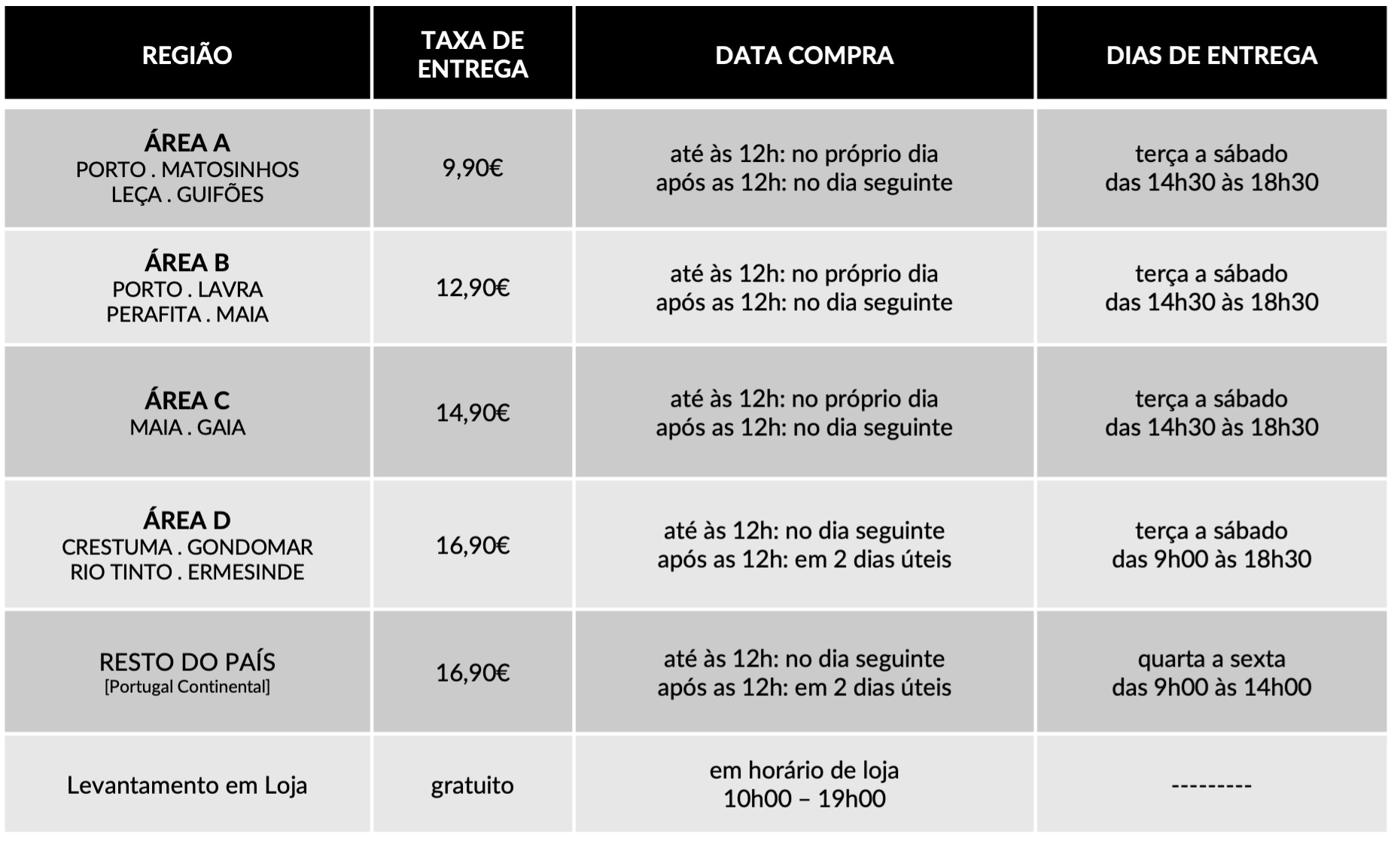
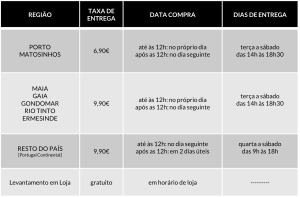
FAQ
Dedicamos toda a atenção na manutenção e preservação das nossas Flores, garantindo que cheguem ao nosso cliente com toda a frescura, qualidade e beleza. Disponibilizamos várias soluções de manutenção e embalamentos adequando sempre a cada necessidade e contexto da entrega.
Pode incluir na sua oferta uma mensagem personalizada que irá ser reproduzida por nós. No processo da compra online basta preencher o campo ”dedicatória” e escrever a mensagem pretendida.
Valorizamos e priorizamos a qualidade dos serviços e dos nossos produtos. Todas as flores disponibilizadas nos ramos e arranjos disponíveis na loja online são frescas e estão em condições de servir o destinatário.
Caso haja alguma insatisfação por parte do cliente, recomendamos que utilize os nossos canais de comunicação para que possamos analisar a questão.
As fotografias são ilustrativas, quer isto dizer que não garantimos a 100% a sua fieldade com a realidade.
As fotografias devem ser interpretadas como uma base de modelo ou de estética onde as alterações estão sujeitas ao stock da flor e ao trabalho humano de cada florista. Note-se que algumas flores são sazonais e não estão disponíveis todo o ano. Como tal, serão necessárias fazer adaptações consoante a época e o stock da flor.
Para casos onde as alterações sejam extremamente notórias, contactaremos o cliente para ajustar a melhor solução.
Não cancelamos nem alteramos encomendas se esta já se encontrar em fase de curso, ou seja, se já tiver saído da loja e em fase de transporte.
Se a encomenda se encontrar no estado inicial, de processo, é possível alterar e cancelar a encomenda e reaver o seu dinheiro.
Caso não havendo outra referência dada pelo utilizador (por exemplo: deixar no porteiro, na loja x, à pessoa y) o utilizador será contactado de imediato para ficar ao corrente da situação e, à falta de alternativas, a encomenda voltará para a Terrárea, Caso seja reagendada uma nova entrega será cobrada novamente taxa de entrega.
Sublinhamos a importância dos dados fornecidos pelo utilizador estarem correctos e claros. Há sempre a possibilidade do utilizador acrescentar um ponto de referência e outras informações para que não hajam quaisquer dúvidas no acto da entrega garantindo, assim, a qualidade do serviço.
Lamentamos mas não podemos facultar essa informação, se o cliente que realizou a encomenda não pretender.
Estamos abertos a alterações embora estas estejam sempre condicionadas pelo tipo de pedido do utilizador, stock em loja e conceito estético. Nestes casos sugerimos o contacto telefónico ou por email.
Queremos satisfazer todos os nossos clientes e oferecer o nosso melhor serviço. Agradecemos, por isso, todas as opiniões e sugestões para podermos encontrar soluções às suas necessidades! Contacte-nos a partir dos seguintes meios: via email info@terrarea.pt ou telefone 223 170 414

How I Use the BSCScan Blockchain Explorer to Vet Smart Contracts and Track PancakeSwap Activity
Wow, this blew my mind. I was digging through a token on BNB Chain last week. The initial transfer pattern looked normal enough at a glance. But when I dove into the contract using the explorer and read the verified source code, I noticed constructor parameters and a hidden function that would allow sudden liquidity burns, which set off immediate red flags. My gut said caution, and then I traced liquidity movements to PancakeSwap pairs.
Whoa, seriously? That was the reaction I had when an owner address moved LP tokens overnight. I clicked around the transaction details to follow the money. The explorer timestamps and internal transactions told a lot more than the token page alone. In short, the more I looked the clearer it became that verification status and on-chain evidence beat marketing every time. I’m biased, but that moment reinforced why I use on-chain tools first.
Here’s the thing. The bscscan blockchain explorer is your starting point. It surfaces contract source, ABI, constructor args, and verification badges that help you separate verified projects from potential scams. If a contract isn’t verified, treat it like a black box until proven otherwise. Check the token transfers tab, and don’t forget the internal txns — those often hide somethin’ important.
Hmm… okay, so check this out—when a contract is verified you can read the source and understand functions. The Read Contract tab often answers immediate questions about ownership or paused flags. The Write Contract tab shows what actions are callable, and by whom, which is crucial. On one hand a renounced ownership flag is meaningful; on the other hand, renouncing can be faked in some proxy setups, though actually it’s still useful to verify. Initially I thought renouncement was always trustworthy, but then realized the proxy pattern can complicate that assumption.
Wow, big realization there. I prefer to decode logs rather than assume anything. Event topics in transfer logs reveal who moved liquidity and when. Decoding requires matching the ABI to the events, which the explorer handles when the source is verified. If the ABI is missing, you can still manually decode with local tools but it’s more work and more error prone.
Whoa, this part bugs me. PancakeSwap pair contracts emit Swap and Sync events that map to liquidity and price changes. Watching the Pair address is often the fastest way to detect rug pulls before price collapses. Using the token’s holder distribution and the top holders tab gives context about risk concentration. If a handful of addresses hold most tokens and those addresses are active on PancakeSwap pairs, raise the alarm. I’m not 100% sure every signal means malicious intent, but patterns add up.
Alright, so here’s a practical checklist I use. First: verify the contract source on the explorer and confirm the compiler version and optimization settings. Second: inspect constructor parameters for router, fee settings, and liquidity flags. Third: check for owner-only functions or transfer restrictions that could block sells. Fourth: follow LP token movement — are LP tokens locked, or did they move to a personal wallet? These are small steps that together shine a light on risk.
Whoa, there are more nuances. Proxy contracts and linked libraries complicate verification, and somethin’ like an incorrect metadata hash will make verification fail even if the source is correct. In those cases I look for verified implementations or request source flattening. If verification still fails, I treat the contract as effectively unverified until the authors clear it up. That approach has prevented me from getting burned more than once.
Here’s one concrete trick I use when tracking PancakeSwap trades. Copy the pair contract address from the token’s liquidity page, then open that address and monitor swaps. The explorer shows exact token amounts, and you can infer price impact and slippage behavior. Watching the “Add Liquidity” and “Remove Liquidity” transactions reveals whether the owner is stealthily draining pools. It sounds obvious, though many people skip this step when excited to buy.
Wow, simple but effective. I also watch for router anomalies such as interactions with non-standard router addresses. PancakeSwap uses known router addresses, and anything else should be scrutinized. Check the function calls in transaction input data for approvals or transferFrom patterns that don’t match typical swaps. If you find approvals to strange addresses, that’s a red flag. Seriously, approvals are like handing someone the keys to your wallet.
Okay, so what about contract verification itself? When you submit source code to verify on the explorer, you need to match the Solidity version, enable the exact optimizer runs, and supply any library addresses used during compilation. If any of that mismatches the on-chain bytecode, verification fails. The explorer’s verification UI walks you through it, but it’s admittedly finicky and sometimes frustrating if you compiled with slightly different settings.
Hmm… proofs and reproducibility matter. I once spent an hour matching a verified contract because the team used a custom solidity planner and different metadata settings; eventually it verified, but the process taught me patience. If a team posts the exact compiler settings and flattened source in their repo, that’s a trust signal. If they don’t, or if they refuse to share, that speaks volumes even before deeper analysis begins.
Whoa, here’s a workflow for new tokens I recommend. Step one: open the token page on the explorer and note the verification badge. Step two: click the contract to inspect the code and search for owner or privileged modifiers. Step three: check the top holders and token distribution chart. Step four: visit the pair contract and watch recent swaps and liquidity moves. Step five: inspect the transaction history for internal txns that might indicate stealth transfers.
Wow, I’m biased but I always cross-check with on-chain analytics too. Tools and trackers that integrate with BSCScan data can speed things up, but the explorer is the canonical source. If an analytics dashboard shows odd metrics, I go back to BSCScan to verify events and txs manually. There’s no substitute for reading the raw evidence, even if it’s slower.
Okay, so watchlists and address labeling help a lot. The explorer lets you tag addresses and follow activity, which is useful if you monitor many projects. When an address is labeled as an exchange, a contract, or a known scammer, that context changes the interpretation of movement. Labels aren’t perfect, though, and you should corroborate with tx patterns rather than rely solely on them.
Whoa, gas economics on BNB Chain moves fast. Blocks are quick and transactions settle faster than on some chains, which means bots and MEV strategies operate aggressively. That dynamic can amplify sudden dumps after liquidity pulls, so timing matters when you track unusual activity. Watching mempool behavior is beyond BSCScan, but the explorer helps reconstruct what happened after the fact. My instinct said faster chain equals safer trades, but actually the speed increases some attack vectors too.
Here’s what scares me about misplaced trust. Verified source code doesn’t automatically mean the team is honest if there are owner-only controls that can be exploited. You must combine code review with on-chain behavior — ownership transfers, liquidity locks, and past patterns. Check for multi-sig guardians or timelocks as trust enhancers. If none exist, assume centralization risk is high.
Wow, some practical tips for PancakeSwap trackers. Use the explorer to find the router and the factory, then query the Pair creation events on the factory to locate early pairs. Early buyers often face rug risks because malicious pairs may be created then paired with a token by the owner. Monitoring creation events and watching wallet interactions immediately after pair creation is a high-signal activity. It takes practice, though, and you’ll get faster with repetition.
Hmm… don’t forget contract verification via API for automation. You can integrate BSCScan’s APIs into scripts that poll verification status, number of holders, or LP movements. That automation lets you alert when an owner address moves LP tokens or when large transfers occur. Automating reduces manual overhead, though you must handle rate limits and occasional API hiccups. Honestly, I script most of my routine checks because it saves time and reduces miss-counts.
Whoa, last thought before the FAQ. Keep a skeptical mindset but don’t be paralyzed by doubt. Use the explorer to build evidence, combine it with PancakeSwap tracking, and apply common-sense heuristics like diversification and small initial buys. Somethin’ as simple as checking the token’s read contract functions and the top holders can save you a lot of grief. I’m not perfect, and sometimes I still miss stuff, but the process reduces risk a lot.
Hands-on: Using the bscscan blockchain explorer to vet a PancakeSwap token
Start at the token page and look for verified source and audit links; then click the contract and examine the Read Contract tab for ownership and paused states. Use the Pair address under “Holders” or “Networks” to inspect swaps, liquidity adds, and LP token movement; cross-reference transfer logs and internal txns to see where funds flowed. If you want a quick jump, I often paste a suspicious contract address into bscscan blockchain explorer and then trace from there to pairs and routers. Check constructor args and compiler settings if verification exists, and look for renounceOwnership calls, timelocks, or multi-sig setups. Finally, don’t trust one signal alone — combine verified source, liquidity lock proof, labeled addresses, and transfer patterns before deciding.
FAQ — common questions when using BSCScan and PancakeSwap trackers
How do I know if a contract is really verified?
Verified means the on-chain bytecode matches the submitted source with the same compiler and optimizer settings; the explorer displays a verified badge and you can read the source and ABI. If verification fails or the source is missing, treat the contract as unverified. Also watch for partial verification where some files match but libraries or metadata differ, which indicates you should investigate further.
What are the fastest signals of a rug pull on PancakeSwap?
Big red flags are sudden LP token transfers to personal wallets, immediate liquidity removal transactions, owner-only burn functions, and concentration of token supply in few addresses. Monitor Pair contract Swap and RemoveLiquidity events and check internal transactions for stealth moves. Small trades with high slippage followed by LP drains are often the sequence that precedes a rug, so early detection matters.