
FAQ
Dedicamos toda a atenção na manutenção e preservação das nossas Flores, garantindo que cheguem ao nosso cliente com toda a frescura, qualidade e beleza. Disponibilizamos várias soluções de manutenção e embalamentos adequando sempre a cada necessidade e contexto da entrega.
Pode incluir na sua oferta uma mensagem personalizada que irá ser reproduzida por nós. No processo da compra online basta preencher o campo ”dedicatória” e escrever a mensagem pretendida.
Valorizamos e priorizamos a qualidade dos serviços e dos nossos produtos. Todas as flores disponibilizadas nos ramos e arranjos disponíveis na loja online são frescas e estão em condições de servir o destinatário.
Caso haja alguma insatisfação por parte do cliente, recomendamos que utilize os nossos canais de comunicação para que possamos analisar a questão.
As fotografias são ilustrativas, quer isto dizer que não garantimos a 100% a sua fieldade com a realidade.
As fotografias devem ser interpretadas como uma base de modelo ou de estética onde as alterações estão sujeitas ao stock da flor e ao trabalho humano de cada florista. Note-se que algumas flores são sazonais e não estão disponíveis todo o ano. Como tal, serão necessárias fazer adaptações consoante a época e o stock da flor.
Para casos onde as alterações sejam extremamente notórias, contactaremos o cliente para ajustar a melhor solução.
Não cancelamos nem alteramos encomendas se esta já se encontrar em fase de curso, ou seja, se já tiver saído da loja e em fase de transporte.
Se a encomenda se encontrar no estado inicial, de processo, é possível alterar e cancelar a encomenda e reaver o seu dinheiro.
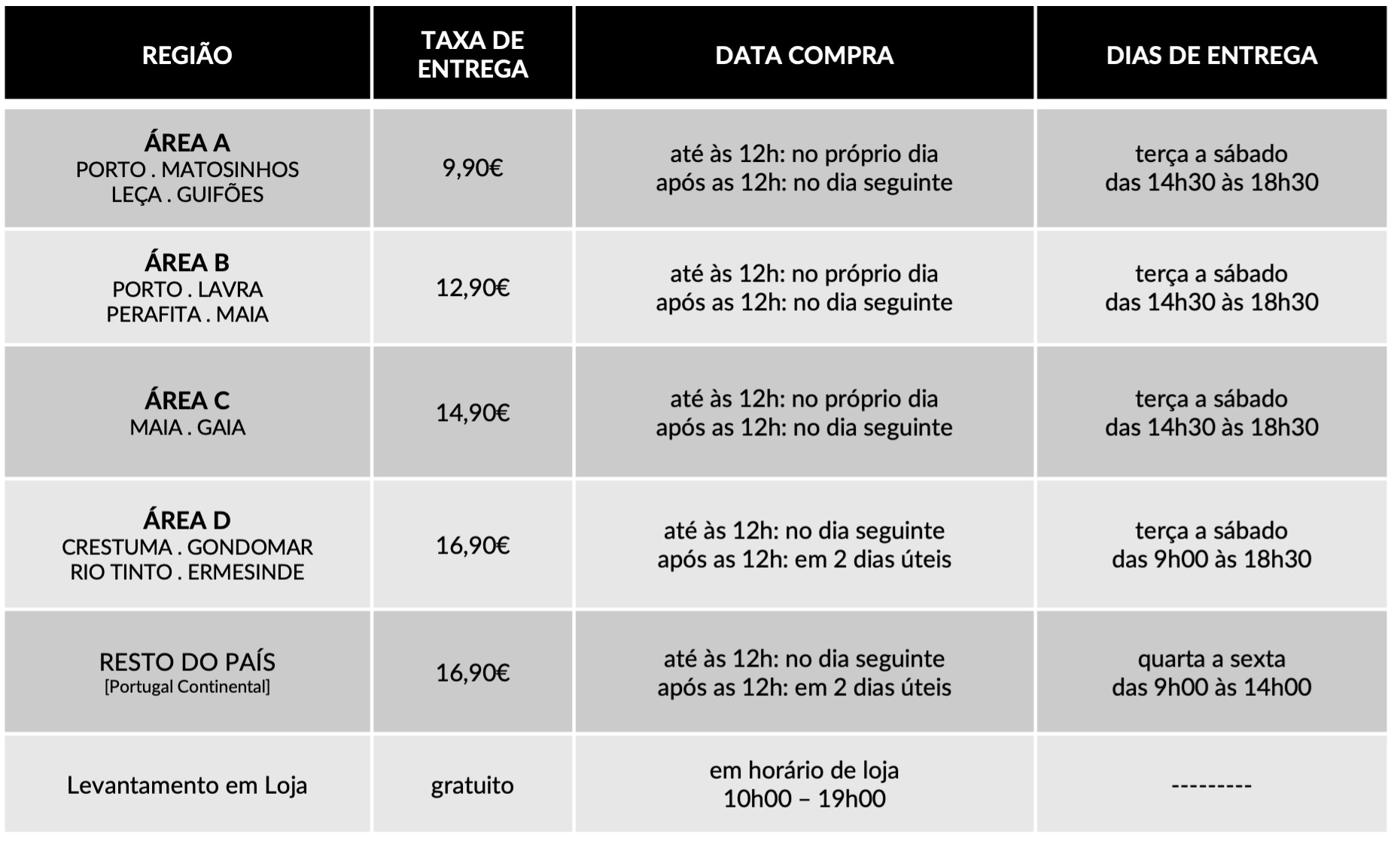
Caso não havendo outra referência dada pelo utilizador (por exemplo: deixar no porteiro, na loja x, à pessoa y) o utilizador será contactado de imediato para ficar ao corrente da situação e, à falta de alternativas, a encomenda voltará para a Terrárea, Caso seja reagendada uma nova entrega será cobrada novamente taxa de entrega.
Sublinhamos a importância dos dados fornecidos pelo utilizador estarem correctos e claros. Há sempre a possibilidade do utilizador acrescentar um ponto de referência e outras informações para que não hajam quaisquer dúvidas no acto da entrega garantindo, assim, a qualidade do serviço.
Lamentamos mas não podemos facultar essa informação, se o cliente que realizou a encomenda não pretender.
Estamos abertos a alterações embora estas estejam sempre condicionadas pelo tipo de pedido do utilizador, stock em loja e conceito estético. Nestes casos sugerimos o contacto telefónico ou por email.
Queremos satisfazer todos os nossos clientes e oferecer o nosso melhor serviço. Agradecemos, por isso, todas as opiniões e sugestões para podermos encontrar soluções às suas necessidades! Contacte-nos a partir dos seguintes meios: via email info@terrarea.pt ou telefone 223 170 414

Which Office should you get? A practical guide to Word, Office 365, and the full suite
Whoa! This stuff gets messy fast. Really. At first glance, it’s just “Word, Excel, PowerPoint” — but then you hit subscriptions, one-time purchases, cloud sync, and suddenly you need a flowchart. My gut said “just buy the subscription,” but then I ran into licensing quirks and family sharing needs and—well—my instinct changed. Initially I thought the choice would be obvious, but then I realized the decision depends on three things: how you work, what devices you own, and how much you like updates.
Okay, so check this out—I’ll walk through the tradeoffs in plain language. Short version: if you want always-latest features and cross-device sync, Office 365 (now Microsoft 365) makes sense. Want a one-time purchase, fewer bells, and no monthly fee? Then a perpetual license might fit. Hmm… there’s more nuance though, especially for businesses and power users.
I’ll be honest: I’m biased toward subscriptions for most people. Why? Updates, cloud storage, and easy reinstall across machines. But that bias doesn’t mean it’s right for you. And somethin’ else—there are free routes, workarounds, and pitfalls that will cost you time if you don’t plan ahead…
What “Word download” and “Office 365” actually mean
Word download can mean different things. You might be downloading the standalone Word app. Or you might be downloading the whole Office suite. Or you might be installing Microsoft 365 apps via an installer that manages updates. Confusing? Yes. Simple answer: Word alone is available in some plans, but most consumers get it as part of a suite.
Microsoft 365 (formerly Office 365) is a subscription service. You pay monthly or yearly. It bundles Word, Excel, PowerPoint, Outlook, OneDrive storage, and other services. Subscriptions include feature updates regularly. On the other hand, Office Home & Student (perpetual license) is a one-time purchase that includes core apps but not the ongoing feature updates or extra cloud perks.
For many people, the choice reduces to two questions: Do you want new features as they come out? And do you need cloud storage included? If yes to either, then microsoft office download via a subscription is the easiest path.
Which option fits common scenarios?
Student or occasional user: Buy the basic one-time Office Home & Student if you only use Word, Excel, and PowerPoint occasionally. It keeps costs predictable. But if you’re taking classes that require OneDrive collaboration or versioned files, consider a subscription.
Remote worker or professional: Subscription. Seriously? Yes. You get Outlook with advanced email features, OneDrive for Business, Teams integration, and frequent security updates. The cost is steady, but for teams it’s often cheaper per user than managing multiple perpetual licenses.
Family use: Microsoft 365 Family lets you share across up to six users, each with their own cloud quota. That often beats buying multiple one-time licenses. My sister and I share a plan; it’s saved us both headaches and file conflicts.
Power users and IT admins: Look at volume licensing, Microsoft 365 Business, or enterprise plans. They include deployment tools, group policies, and advanced security. On one hand, they’re pricier; though actually, when you factor in management time, they can be cost-effective.
Installation basics (Windows and Mac)
Installers differ by platform. Windows installations typically use an online installer that pulls files during setup. Mac installers are package-based. Both will ask for a Microsoft account to activate subscription-based features. If you prefer, you can download offline installers for certain products, but for most users the online installer is simpler and keeps updates automatic.
Pro tip: Back up your product key or account credentials before swapping machines. Trust me—I’ve reinstalled Office late at night and the account recovery dance is annoying.
When you need a place to start the process, consider a verified source for the installer. For general guidance and a download link to get you moving, try the official-looking resource at microsoft office download. It helped me find the right installer quickly. (I’m not 100% sure every third-party mirror is perfect, so cross-check with Microsoft support pages if you see anything odd.)
Activation and accounts — the stumbling blocks
Activation ties to an account. That means when you switch machines, you deactivate a device or sign out. For subscriptions, you can usually sign into multiple devices—depending on your plan. One-time purchases usually allow activation on a single machine (or one desktop + one laptop, depending on the license). There are grey areas and exceptions. On one hand, companies paint flexible words in their licensing docs; on the other hand, support reps will sometimes give different answers. Sigh.
Also—watch for bundled OEM versions. Some laptops come with trial Office or OEM keys that are limited. If your machine came with a trial license, you’ll need to convert or buy a proper license.
Updates, features, and the hidden costs
Subscription: constant updates, new features, security patches. Nice. Perpetual: stable features, but you miss innovations unless you buy the next major release. On the other hand, continuous updates can disrupt workflows if a new UI change breaks macros or templates you rely on. So, if you have mission-critical templates, test updates in a controlled environment.
Hidden costs include storage: if you need lots of OneDrive space beyond the included quota, that adds up. Also, third-party add-ins may require separate licenses. And finally: time. Migrating multiple users between plans is fiddly. Don’t underestimate the admin time.
Alternatives and free options
Free alternatives exist—Google Docs, LibreOffice, and web-only Office for the web. Those are fine for basic tasks. If collaboration and compatibility matter, Office Online can handle most everyday needs without installation, but it lacks some desktop-only advanced features like complex macros or local add-ins.
For people who only need occasional editing, the web versions are surprisingly capable. But for offline work, heavy formatting, or advanced VBA macros, you’ll want the desktop apps.
Common problems and quick fixes
Slow startup? Disable add-ins temporarily. Crashing during save? Check file path length and network locations. Can’t activate? Verify the account on the portal and confirm your subscription is active. Printer issues? Update drivers and check that Word’s print spooler settings aren’t conflicting. These things are tedious to troubleshoot, I know—but they’re usually fixable without reinstalling everything.
Frequently asked questions
Do I need a subscription to get Word?
No. You can buy Word as part of a one-time Office package, but subscriptions bundle more services and cross-device access. I’m biased toward subscriptions for families and professionals, though a basic one-time purchase is fine for light users.
Can I install Office on multiple devices?
Subscription plans often allow multiple installs across devices. Perpetual licenses are usually limited. Always check the license terms. Something that tripped me up: some “lifetime” OEM installs are tied to the original hardware.
Is the web version good enough?
For simple documents and collaboration, yes. For advanced formatting, macros, or offline reliability, the desktop apps are better. On the flip side, web versions update without you noticing, which is great for teams.
Here’s what bugs me about this whole ecosystem: Microsoft has fragmented options that feel like feature islands. You can buy a thing, rent a thing, or use a web thing. On one hand, that flexibility is powerful; on the other, it makes choice harder. Really, it’s about mapping your workflow to the plan: simple writers can save money. Power users should invest. Teams should standardize.
Okay—final nudge. If you want a quick, safe starting point for installation or an installer resource, head to the microsoft office download link above. Start there, confirm your license type, and then decide whether to subscribe or buy once. And hey—if you want, test the subscription for a month and see whether the extra features are worth it to you.