
FAQ
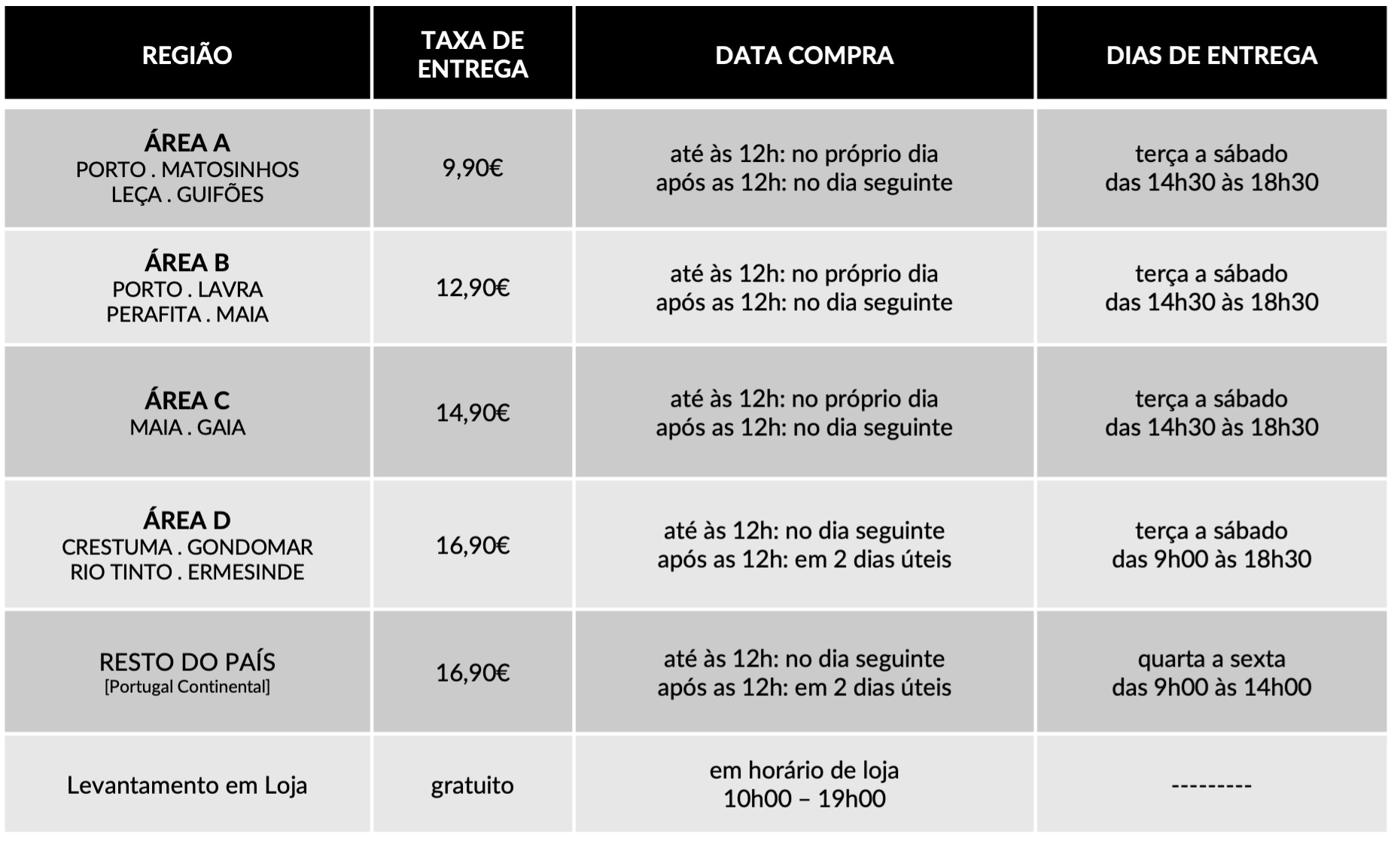
Dedicamos toda a atenção na manutenção e preservação das nossas Flores, garantindo que cheguem ao nosso cliente com toda a frescura, qualidade e beleza. Disponibilizamos várias soluções de manutenção e embalamentos adequando sempre a cada necessidade e contexto da entrega.
Pode incluir na sua oferta uma mensagem personalizada que irá ser reproduzida por nós. No processo da compra online basta preencher o campo ”dedicatória” e escrever a mensagem pretendida.
Valorizamos e priorizamos a qualidade dos serviços e dos nossos produtos. Todas as flores disponibilizadas nos ramos e arranjos disponíveis na loja online são frescas e estão em condições de servir o destinatário.
Caso haja alguma insatisfação por parte do cliente, recomendamos que utilize os nossos canais de comunicação para que possamos analisar a questão.
As fotografias são ilustrativas, quer isto dizer que não garantimos a 100% a sua fieldade com a realidade.
As fotografias devem ser interpretadas como uma base de modelo ou de estética onde as alterações estão sujeitas ao stock da flor e ao trabalho humano de cada florista. Note-se que algumas flores são sazonais e não estão disponíveis todo o ano. Como tal, serão necessárias fazer adaptações consoante a época e o stock da flor.
Para casos onde as alterações sejam extremamente notórias, contactaremos o cliente para ajustar a melhor solução.
Não cancelamos nem alteramos encomendas se esta já se encontrar em fase de curso, ou seja, se já tiver saído da loja e em fase de transporte.
Se a encomenda se encontrar no estado inicial, de processo, é possível alterar e cancelar a encomenda e reaver o seu dinheiro.
Caso não havendo outra referência dada pelo utilizador (por exemplo: deixar no porteiro, na loja x, à pessoa y) o utilizador será contactado de imediato para ficar ao corrente da situação e, à falta de alternativas, a encomenda voltará para a Terrárea, Caso seja reagendada uma nova entrega será cobrada novamente taxa de entrega.
Sublinhamos a importância dos dados fornecidos pelo utilizador estarem correctos e claros. Há sempre a possibilidade do utilizador acrescentar um ponto de referência e outras informações para que não hajam quaisquer dúvidas no acto da entrega garantindo, assim, a qualidade do serviço.
Lamentamos mas não podemos facultar essa informação, se o cliente que realizou a encomenda não pretender.
Estamos abertos a alterações embora estas estejam sempre condicionadas pelo tipo de pedido do utilizador, stock em loja e conceito estético. Nestes casos sugerimos o contacto telefónico ou por email.
Queremos satisfazer todos os nossos clientes e oferecer o nosso melhor serviço. Agradecemos, por isso, todas as opiniões e sugestões para podermos encontrar soluções às suas necessidades! Contacte-nos a partir dos seguintes meios: via email info@terrarea.pt ou telefone 223 170 414

Why Google Authenticator Still Matters — And When to Pick Something Else
Whoa! This topic nags at me. Seriously? Two-factor authentication is both simple and maddening. My first impression was: install the app, done. But then stuff happens — phone dies, you lose access, or a backup is missing — and everything gets messy. Here’s the thing: Google Authenticator (and TOTP-based apps generally) are brilliant for what they do, but they come with trade-offs that users rarely consider until they’re locked out.
Short version: Google Authenticator is a Time-based One-Time Password (TOTP) generator that runs locally on your device and gives you 6-8 digit codes you type into websites. Hmm… that description sounds dry, but the practical upshot is this — no cellular service needed, no SMS vulnerabilities, just a ticking clock and a code. My instinct said this was enough for most folks, though actually, wait—let me rephrase that: it’s enough for many cases, but not all.
How TOTP works (without the fluff)
TOTP stands for Time-based One-Time Password. In plain terms: your phone and the service share a secret key. Every 30 seconds both sides compute a code from that key and the current time. If the code you type matches what the server expects, you’re in. On one hand that’s elegant and low-friction. On the other hand it means you need to protect that secret; lose it, and you lose access.
At first glance it’s almost magic. At second glance it’s cryptography plus clocks. On the third glance you notice the ugly bits: backups, transfers, and account recovery. Initially I thought the ecosystem had figured that part out. Then I spent an afternoon helping a friend reset ten accounts because they swapped phones with no backup. Oof.
Why people pick Google Authenticator
It’s lightweight. It just works. No account sign-in, no cloud sync, and very little surface for server-side compromise. For people who want minimal dependencies this is a huge plus. I’m biased, but I like tools that do one thing well. Also, for older systems and enterprise setups, Google Authenticator is often the path of least resistance.
But—there’s a caveat. Because it avoids cloud sync, moving between devices can be manual and painful. Some people write down recovery codes, or take screenshots (not great). Others, uh, use somethin’ creative and then regret it later… very very important to plan ahead.
Common headaches and how to avoid them
Lost phone? Check. Broken screen? Check. Reset device without exporting codes? Double check. Those scenarios suck. The mitigation strategies are straightforward though sometimes tedious: enable account recovery options where offered, store recovery codes in a secure password manager, or export TOTP secrets before changing phones. If you keep only one method of access, you increase the chance of getting locked out.
Initially I recommended taking pictures of QR codes and storing them offline. But then I realized how risky that can be if the storage isn’t encrypted — so actually, use an encrypted password manager or a hardware-backed backup. On one hand backups solve the problem; on the other hand they introduce a single point of failure if mishandled. See the catch? It’s all trade-offs.
When you should pick a different 2fa app
Choose a different app if you want cloud sync across devices, or easier migration, or extra features like biometric unlock or secure cloud recovery. If you care about convenience and are willing to trust a vendor-provided backup, alternatives can be compelling. For people managing lots of accounts, the convenience is worth the small additional trust surface.
Check this out—if you want a simple way to test alternative apps, try downloading a modern 2fa app and add one of your less-critical accounts first. That lets you evaluate migration, backup options, and the UX without risking essential access. Oh, and by the way… always keep at least one recovery option that doesn’t rely solely on your phone.
Practical setup tips (step-by-step-ish)
1) When enabling 2FA on a site, copy and save the recovery codes before you scan the QR. Seriously. 2) Export your TOTP keys if your app supports it, and import them into the new device before wiping the old one. 3) Consider a password manager that can store TOTP secrets as an encrypted backup. 4) Use device-level security — PIN, biometric — to protect the authenticator app. These are simple steps that prevent most disasters.
Something felt off the first time I told a client to “just use Google Authenticator” — there was no plan for recovery, and that’s a rookie mistake. My advice now is more measured; plan for failure, then you’re fine.
Common questions about Google Authenticator and TOTP
Is Google Authenticator secure enough?
Yes, for most users it offers strong security compared to SMS-based 2FA. It’s resistant to SIM swapping and phishing that targets SMS. Though it’s not immune to device compromise or poor backup practices. I’m not 100% sure about every edge case, but for general use it’s a solid choice.
What if I lose my device?
Use recovery codes or alternate 2FA methods (backup phone, hardware token) to regain access. If you didn’t set those up, contact the service’s account recovery — which can be slow and frustrating. Plan ahead so you don’t have to improvise.
Should I use cloud-syncing 2FA apps?
Depends. If you value convenience and multi-device access, yes. If you prefer minimal trust and local-only secrets, stick with apps like Google Authenticator. On one hand cloud sync increases convenience; on the other hand it increases reliance on the vendor’s security. It’s your call.