
FAQ
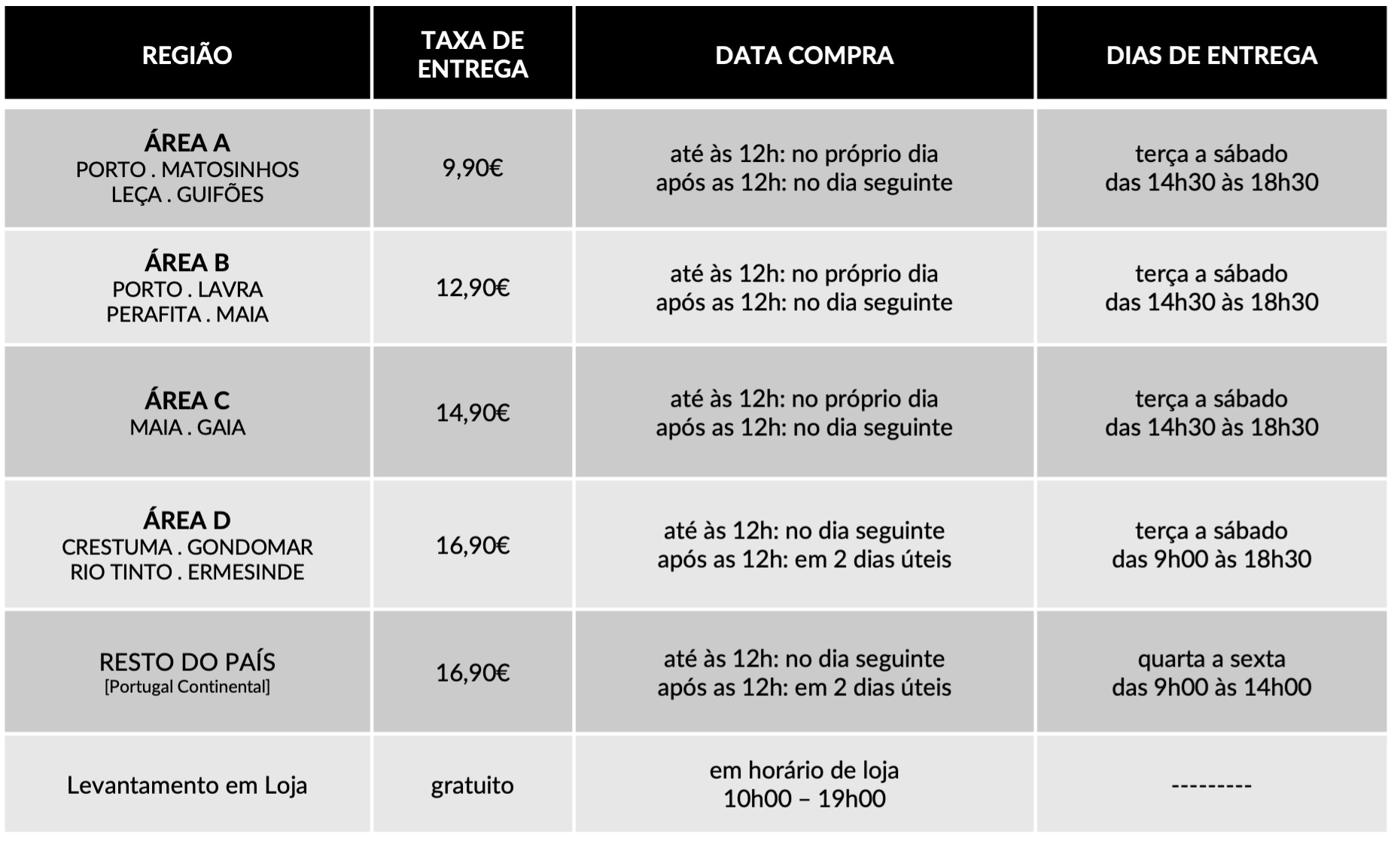
Dedicamos toda a atenção na manutenção e preservação das nossas Flores, garantindo que cheguem ao nosso cliente com toda a frescura, qualidade e beleza. Disponibilizamos várias soluções de manutenção e embalamentos adequando sempre a cada necessidade e contexto da entrega.
Pode incluir na sua oferta uma mensagem personalizada que irá ser reproduzida por nós. No processo da compra online basta preencher o campo ”dedicatória” e escrever a mensagem pretendida.
Valorizamos e priorizamos a qualidade dos serviços e dos nossos produtos. Todas as flores disponibilizadas nos ramos e arranjos disponíveis na loja online são frescas e estão em condições de servir o destinatário.
Caso haja alguma insatisfação por parte do cliente, recomendamos que utilize os nossos canais de comunicação para que possamos analisar a questão.
As fotografias são ilustrativas, quer isto dizer que não garantimos a 100% a sua fieldade com a realidade.
As fotografias devem ser interpretadas como uma base de modelo ou de estética onde as alterações estão sujeitas ao stock da flor e ao trabalho humano de cada florista. Note-se que algumas flores são sazonais e não estão disponíveis todo o ano. Como tal, serão necessárias fazer adaptações consoante a época e o stock da flor.
Para casos onde as alterações sejam extremamente notórias, contactaremos o cliente para ajustar a melhor solução.
Não cancelamos nem alteramos encomendas se esta já se encontrar em fase de curso, ou seja, se já tiver saído da loja e em fase de transporte.
Se a encomenda se encontrar no estado inicial, de processo, é possível alterar e cancelar a encomenda e reaver o seu dinheiro.
Caso não havendo outra referência dada pelo utilizador (por exemplo: deixar no porteiro, na loja x, à pessoa y) o utilizador será contactado de imediato para ficar ao corrente da situação e, à falta de alternativas, a encomenda voltará para a Terrárea, Caso seja reagendada uma nova entrega será cobrada novamente taxa de entrega.
Sublinhamos a importância dos dados fornecidos pelo utilizador estarem correctos e claros. Há sempre a possibilidade do utilizador acrescentar um ponto de referência e outras informações para que não hajam quaisquer dúvidas no acto da entrega garantindo, assim, a qualidade do serviço.
Lamentamos mas não podemos facultar essa informação, se o cliente que realizou a encomenda não pretender.
Estamos abertos a alterações embora estas estejam sempre condicionadas pelo tipo de pedido do utilizador, stock em loja e conceito estético. Nestes casos sugerimos o contacto telefónico ou por email.
Queremos satisfazer todos os nossos clientes e oferecer o nosso melhor serviço. Agradecemos, por isso, todas as opiniões e sugestões para podermos encontrar soluções às suas necessidades! Contacte-nos a partir dos seguintes meios: via email info@terrarea.pt ou telefone 223 170 414

Why Cold Storage Still Matters — and How to Think About Your Ledger Setup
Whoa! Cold storage feels almost old-school again, huh? But seriously, when markets get loud and prices swing, my gut tightens — I want keys offline. Cold storage is the no-nonsense bedrock for long-term crypto holdings. Initially I thought hardware wallets were a solved problem, but then I watched someone paste their seed phrase into a browser form. Oof. That stuck with me.
Here’s the thing. A hardware wallet like a Ledger Nano is a tiny fortress for your private keys, but the fortress only works if you lock the gate right. My instinct said, don’t rush the setup. Take a breath. Check everything. I mean, I once set up a device over coffee and nearly missed a firmware prompt. Not my finest hour, and that little slip coulda cost me.
Okay, practical talk now. Cold storage means your private keys never touch an internet-connected device. Period. No exchanges, no phone apps, no cloud backups. Sounds strict. It is. But that strictness is why assets survive long chaos. On one hand, it’s extra effort. On the other hand, it dramatically reduces attack surface. Though actually, low-tech mistakes—writing seed words on a napkin and leaving it in a bookstore—are still the top risk I see.
Setting Up a Ledger Nano — the human, not-the-bot checklist
So you bought a Ledger Nano. Nice. First impressions: the box looks legit, the seal is intact, and it feels solid. Good. Now pause. Seriously? Verify the device on the manufacturer’s site before you plug it in. I usually tell friends to go to the official domain (ledger.com) from a browser they trust, and to confirm model specifics and setup guides. If you want a direct download, some folks use this ledger wallet download link—but be picky. Verify hashes and certificate details when you can. I’m biased, but buying from authorized dealers is worth the peace of mind.
Fast checklist—short bullets in your head:
– Unbox in a clean, calm space. No distractions.
– Power the device via USB only when you can confirm firmware authenticity.
– Generate the seed phrase on-device; never enter it into a computer.
– Use a strong PIN and change defaults.
– Consider a metal backup for the seed words (very very resistant to fire/water).
Hmm… something felt off about telling people to “just write down the seed.” So let me rephrase—do write it down, but use a method that survives spills and moves. I once saw a seed on a sticky note taped under a desk. Not great. (oh, and by the way…) if you have roommates or family, treat the seed like a master key — not casual knowledge.
Ledger Live and Software Hygiene
Ledger Live is the common interface many people use to manage accounts. It’s useful. It also becomes the interface where errors happen. Initially I thought running Ledger Live on any machine was fine. But then I audited a setup where the user’s laptop had malware. That changes everything. So, two-pronged approach: keep the device firmware current, and keep the host computer clean. On one hand, firmware updates patch bugs and add coin support. On the other, updates are a vector, so always verify update prompts on the device screen itself.
Use Ledger Live on a dedicated user account when possible, and avoid installing random browser extensions that promise “easy swaps.” Consider using a fresh OS image on a spare laptop for big transfers. Sounds extreme? Maybe. But that’s how I sleep easy when moving large sums.
Backup Strategies — paper, metal, and redundancies
Paper backups are simple but fragile. Metal backups are robust but pricier. I keep both styles in different locations—one in a fireproof safe, another in a safety deposit box. On privacy, think compartmentalization: don’t keep all copies in one place. Also, don’t write “crypto seed” on the outside of any container. Sounds obvious, but people do dumb things when they’re tired.
Also: consider Shamir backups (SLIP-39) or multi-sig setups for very large balances. They’re not candy — you need to understand the failure modes. Multi-sig is great because an attacker needs to compromise multiple devices or custodians. But it’s operationally heavier: you must coordinate signatures, keep track of devices, and test regularly. Test your recovery. I can’t stress that enough. Many people set up backups and never test a restore until panic time. That’s the worst time to learn the restore process.
Common Pitfalls I Keep Seeing
1) Seed exposure: typing seed words into cloud docs or photos. Really? Don’t do it.
2) Fake websites/emails: phishing is subtle and creative. Always confirm the URL, then double-confirm.
3) Buying second-hand devices: a used hardware wallet can be tampered with. If you buy used, factory-reset it and verify provenance. Still risky.
4) Rushing transactions: check addresses on the device screen, not just on your laptop.
Something else bugs me: people think “cold storage” equals “set and forget.” I’m not 100% sure that’s right for everyone. You need periodic reviews. Are your contact people still reachable? Are bank accounts for fiat still valid? Who gets access if you pass? These are life questions as much as security ones.
Threat Models — who are you defending against?
Different threats require different defenses. If you’re protecting from casual theft, a PIN and seed in a safe might be enough. If you’re protecting millions, think multi-sig, geographic diversification, and legal estate planning. On one hand, the DIY enthusiast can learn multi-sig. On the other hand, institutional needs often justify pro custody or legal wrappers. There’s no one-size-fits-all answer.
Also, consider social engineering. An attacker might try to manipulate you through support scams or fake legal threats. Pause before you act. My rule: if someone pressures me urgently about moving assets, I treat them as hostile until proven otherwise. Call trusted contacts. Wait a day. Little delays are cheap insurance.
FAQ
Q: Can I set up Ledger Live on any computer?
A: Pretty much, but prefer a clean, updated machine. Avoid shared public PCs. Always verify firmware prompts directly on the Ledger device screen before approving changes.
Q: Is a Ledger Nano enough for long-term storage?
A: For most users, yes. For very large holdings, combine hardware wallets with multi-sig or custodial checks. Also plan for heirs — hardware alone doesn’t solve estate access.
Q: What about recovery phrases—should I ever store them digitally?
A: No. Don’t store the full seed phrase in cloud storage, email, or photos. If you must use a password manager, only store encrypted shards, and still keep at least one offline metal or paper backup.