
FAQ
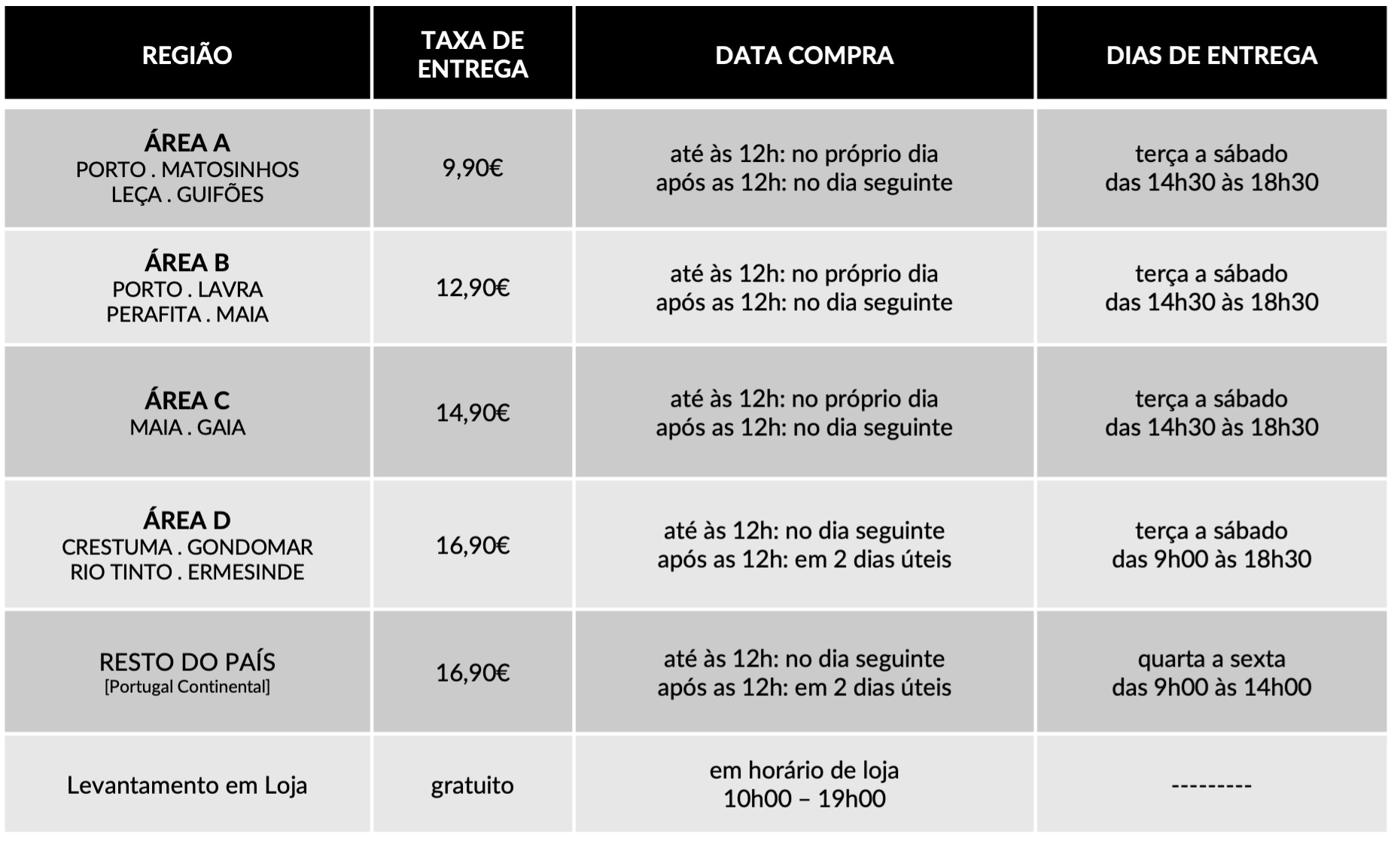
Dedicamos toda a atenção na manutenção e preservação das nossas Flores, garantindo que cheguem ao nosso cliente com toda a frescura, qualidade e beleza. Disponibilizamos várias soluções de manutenção e embalamentos adequando sempre a cada necessidade e contexto da entrega.
Pode incluir na sua oferta uma mensagem personalizada que irá ser reproduzida por nós. No processo da compra online basta preencher o campo ”dedicatória” e escrever a mensagem pretendida.
Valorizamos e priorizamos a qualidade dos serviços e dos nossos produtos. Todas as flores disponibilizadas nos ramos e arranjos disponíveis na loja online são frescas e estão em condições de servir o destinatário.
Caso haja alguma insatisfação por parte do cliente, recomendamos que utilize os nossos canais de comunicação para que possamos analisar a questão.
As fotografias são ilustrativas, quer isto dizer que não garantimos a 100% a sua fieldade com a realidade.
As fotografias devem ser interpretadas como uma base de modelo ou de estética onde as alterações estão sujeitas ao stock da flor e ao trabalho humano de cada florista. Note-se que algumas flores são sazonais e não estão disponíveis todo o ano. Como tal, serão necessárias fazer adaptações consoante a época e o stock da flor.
Para casos onde as alterações sejam extremamente notórias, contactaremos o cliente para ajustar a melhor solução.
Não cancelamos nem alteramos encomendas se esta já se encontrar em fase de curso, ou seja, se já tiver saído da loja e em fase de transporte.
Se a encomenda se encontrar no estado inicial, de processo, é possível alterar e cancelar a encomenda e reaver o seu dinheiro.
Caso não havendo outra referência dada pelo utilizador (por exemplo: deixar no porteiro, na loja x, à pessoa y) o utilizador será contactado de imediato para ficar ao corrente da situação e, à falta de alternativas, a encomenda voltará para a Terrárea, Caso seja reagendada uma nova entrega será cobrada novamente taxa de entrega.
Sublinhamos a importância dos dados fornecidos pelo utilizador estarem correctos e claros. Há sempre a possibilidade do utilizador acrescentar um ponto de referência e outras informações para que não hajam quaisquer dúvidas no acto da entrega garantindo, assim, a qualidade do serviço.
Lamentamos mas não podemos facultar essa informação, se o cliente que realizou a encomenda não pretender.
Estamos abertos a alterações embora estas estejam sempre condicionadas pelo tipo de pedido do utilizador, stock em loja e conceito estético. Nestes casos sugerimos o contacto telefónico ou por email.
Queremos satisfazer todos os nossos clientes e oferecer o nosso melhor serviço. Agradecemos, por isso, todas as opiniões e sugestões para podermos encontrar soluções às suas necessidades! Contacte-nos a partir dos seguintes meios: via email info@terrarea.pt ou telefone 223 170 414

Why I Still Use TradingView for Crypto Charts (and How to Download It Safely)
Okay, so check this out—I’ve been living in chart land for years. Seriously? Yeah. The screens, the indicators, the dozen tabs open at 3am. Whoa! My instinct said TradingView would be the one-stop spot for crypto and trading charts, and for the most part it delivered. Initially I thought it was just pretty visuals, but then realized the depth of its data, community scripts, and multi-device sync actually matters when you trade fast and sleep rarely.
Here’s the thing. TradingView is a web-first platform that also offers desktop and mobile apps, and that mix is useful. Short note: the web version feels lighter. The desktop app gives you native performance and fewer browser hiccups. On a MacBook or Windows rig, you can get the desktop client and often shave off lag. I grabbed mine via a link I trust — you can find it right here if you want the installer quickly. Hmm… that felt too salesy, but whatever.
What works (and what bugs me)
The charting engine: smooth, responsive, and full of neat toggles. Medium timeframes snap, and drawing tools stay sticky. The order of operations is intuitive. My first impressions were “wow, clean UI,” though actually the real strength is how it layers indicators without turning into a soup. On one hand the built-in indicators are well made; on the other hand, somethin’ about too many default overlays can make the charts noisy very very quickly.
Alerts are powerful. You can tie alerts to price, indicators, or Pine Script conditions, and they come through desktop, SMS, email, or mobile push. That flexibility matters when markets move while you’re driving (yes, guilty). Initially I thought alerts would be spammy, but with filters and webhook support they become real tools—server-driven automation and strategy alerts are why many pros rely on TradingView.
Pine Script is a double-edge. It’s approachable, honestly. You can prototype indicators fast. But when your strategy grows complex, Pine’s execution model and versioning can feel restrictive compared to full-blown languages. I wrote a couple indicators, then refactored them because edge cases popped up—so, caution: test, test, test.
Data quality for crypto is mostly solid. Pro tip: check which exchange feed you’re using for a given symbol. Bitstamp, Binance, Coinbase—each has different spreads and fill characteristics. My instinct said to default to Binance for liquidity, though for certain coins Coinbase can be cleaner. On longer timeframes this rarely matters; intraday scalping? It absolutely matters.
Download tips and safety
Downloading an app feels trivial, but a bad installer or shady site can ruin your weekend. So—be picky. Use the official sources when possible, and verify signatures or store badges. For convenience I linked a direct installer source above that I used personally. I’m biased, though: I prefer the native desktop app on Windows for keyboard shortcuts and system-level notifications.
Install advice: close other trading apps, and give the client permission for notifications. If you’re on a work machine watch out for restrictive group policies. Also keep backups of layout templates and watchlists—TradingView stores a lot in the cloud, but local export (CSV, layout save) is your friend.
Setting up crypto charts like a pro
Start with clean templates. One template per strategy. Seriously. Use one for swing setups, one for scalping, and one for long-term hodl analysis. Short sentence: fewer distractions. Then add these layers in order: price, volume, one trend indicator, and one momentum oscillator. If you over-index on indicators, you’ll get conflict signals and second-guessing. My gut feeling? Less is better, but customize.
Multi-chart layouts are invaluable when scanning multiple timeframes. You can sync symbol, crosshair, and timeframes across panes. That bit saved me time during volatile sessions. On a larger monitor, stack 4 charts: daily, 4-hour, 1-hour, and 15-minute. It gives you a real-time hierarchy of conviction (and also anxiety… but yield’s worth the stress sometimes).
Drawing objects and templates—learn the hotkeys. Seriously, muscle memory is everything. R key for reset, CTRL/CMD+Z for undo, and dedicated shortcut sets for trendlines and fibs. You’ll shave precious seconds when trades are live. Also: use anchors for fib retraces across multiple charts, and save them as template so you don’t redraw every session.
Advanced tips — alerts, webhooks, and automation
Webhook alerts turn TradingView into a signals engine. You can send alerts to a small server, which then routes orders to your broker or exchange via API. Initially that idea felt sci-fi to me, but after one sloppy manual trade I set it up. It reduced mistakes. Actually, wait—let me rephrase that: it reduced human timing errors, though you still need stop logic upstream.
Webhook payloads carry custom fields, so you can include direction, size, or even tags for the receiver to parse. On one hand this is powerful; on the other hand, secure your receiver endpoints. Never expose raw keys in the alert body. (Oh, and by the way… log every incoming signal—auditing helps when things go sideways.)
Pine Script alerts can be scheduled and backtested in a limited way. Use paper trading to validate live performance before committing capital. Paper trading simulates fills differently than real exchanges, though—so expect slippage in live conditions. I’m not 100% sure about the exact slippage numbers for every exchange, but conservatively plan for 0.1%–0.5% on liquid pairs and higher on small caps.
FAQ
Is the TradingView download safe?
Yes, if you use official installers and verified sources. The link above points to a trusted installer I used. Still, run standard checks—antivirus scan and checksum verification if available. If you’re unsure, use the web version.
Do I need Pro to trade crypto effectively?
Not strictly. Free users get a lot. But Pro or Pro+ adds multi-chart layouts, faster data, and more alerts, which matter for active traders. If you’re casual, free may be fine. If latency and many alerts matter, consider paid tiers.
Can I automate orders from TradingView?
Indirectly. Alerts and webhooks can trigger trading bots or broker APIs. TradingView itself doesn’t directly execute across all exchanges, so you’d use an intermediary server or an integration partner. Test thoroughly.