
FAQ
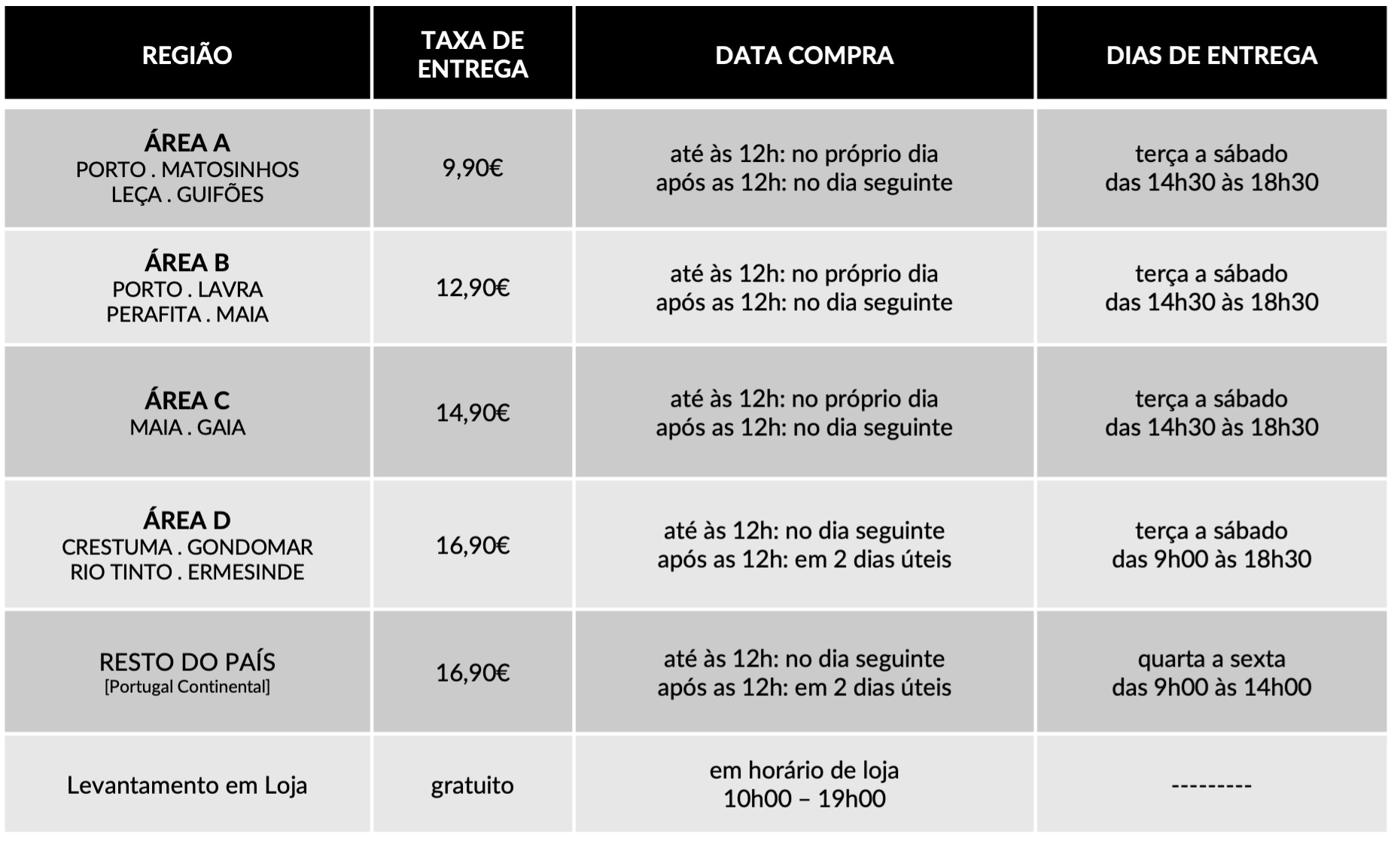
Dedicamos toda a atenção na manutenção e preservação das nossas Flores, garantindo que cheguem ao nosso cliente com toda a frescura, qualidade e beleza. Disponibilizamos várias soluções de manutenção e embalamentos adequando sempre a cada necessidade e contexto da entrega.
Pode incluir na sua oferta uma mensagem personalizada que irá ser reproduzida por nós. No processo da compra online basta preencher o campo ”dedicatória” e escrever a mensagem pretendida.
Valorizamos e priorizamos a qualidade dos serviços e dos nossos produtos. Todas as flores disponibilizadas nos ramos e arranjos disponíveis na loja online são frescas e estão em condições de servir o destinatário.
Caso haja alguma insatisfação por parte do cliente, recomendamos que utilize os nossos canais de comunicação para que possamos analisar a questão.
As fotografias são ilustrativas, quer isto dizer que não garantimos a 100% a sua fieldade com a realidade.
As fotografias devem ser interpretadas como uma base de modelo ou de estética onde as alterações estão sujeitas ao stock da flor e ao trabalho humano de cada florista. Note-se que algumas flores são sazonais e não estão disponíveis todo o ano. Como tal, serão necessárias fazer adaptações consoante a época e o stock da flor.
Para casos onde as alterações sejam extremamente notórias, contactaremos o cliente para ajustar a melhor solução.
Não cancelamos nem alteramos encomendas se esta já se encontrar em fase de curso, ou seja, se já tiver saído da loja e em fase de transporte.
Se a encomenda se encontrar no estado inicial, de processo, é possível alterar e cancelar a encomenda e reaver o seu dinheiro.
Caso não havendo outra referência dada pelo utilizador (por exemplo: deixar no porteiro, na loja x, à pessoa y) o utilizador será contactado de imediato para ficar ao corrente da situação e, à falta de alternativas, a encomenda voltará para a Terrárea, Caso seja reagendada uma nova entrega será cobrada novamente taxa de entrega.
Sublinhamos a importância dos dados fornecidos pelo utilizador estarem correctos e claros. Há sempre a possibilidade do utilizador acrescentar um ponto de referência e outras informações para que não hajam quaisquer dúvidas no acto da entrega garantindo, assim, a qualidade do serviço.
Lamentamos mas não podemos facultar essa informação, se o cliente que realizou a encomenda não pretender.
Estamos abertos a alterações embora estas estejam sempre condicionadas pelo tipo de pedido do utilizador, stock em loja e conceito estético. Nestes casos sugerimos o contacto telefónico ou por email.
Queremos satisfazer todos os nossos clientes e oferecer o nosso melhor serviço. Agradecemos, por isso, todas as opiniões e sugestões para podermos encontrar soluções às suas necessidades! Contacte-nos a partir dos seguintes meios: via email info@terrarea.pt ou telefone 223 170 414

Why Phantom’s Extension Feels So Smooth — And What to Watch Out For
Okay, so check this out—I’ve been messing with Solana wallets for years, and Phantom keeps popping up as the go-to extension for DeFi and NFTs. Whoa! It really is slick. The UI is clean, transactions are fast, and connecting to dapps usually just works. But my instinct said: don’t get lazy. Something felt off about how casually people trust browser extensions, and that’s worth unpacking.
At first glance, Phantom is the effortless bridge between your browser and the Solana chain. But on one hand you’ve got convenience, and on the other hand you’ve got attack surface—though actually, that’s not a purely binary tradeoff. Initially I thought the extension model was inherently risky, but then realized that with a few practices you can reduce most of the common threats to an acceptable level. I’ll be honest: I’m biased toward hardware-backed keys, but for many users the extension is fine when used carefully.
Seriously? Yes. Browser extensions run inside your browser process, and they inherit all the trappings of whatever tabs you have open. That means a malicious site, a compromised extension, or a bad Chrome/Firefox plugin could try to trick you into signing a transaction you didn’t intend. Hmm… so what does that look like in practice? Phishing links, fake buttons that request signing, and tiny UI changes meant to confuse are the main culprits.
How I use Phantom — and how you should too
I use Phantom as my daily driver for small trades and NFT browsing. For anything sizable, I move funds to a Ledger or a multisig. For folks getting started, phantom wallet is a good place to begin. The setup is quick. The extension asks for a seed phrase once, encrypts it locally, and then lets you interact with Solana apps. But don’t treat that onboarding like a finish line—security is ongoing.
Here are pragmatic steps that actually matter. Short list first: lock your wallet when idle. Use hardware for large sums. Revoke unused approvals. Keep your browser tidy. Now the longer, nitty-gritty stuff—because the devil lives in the details, and I like details.
Permission hygiene: Many dapps ask for access beyond what they need. If a site requests “view and manage” when you only intended a simple token swap, pause. Ask yourself: does this dapp need open-ended permissions? If not, deny or use a fresh session in a sandboxed profile. This seems obvious, but people click accept. Very very important: audit the list of granted approvals every few weeks.
Transaction context: Phantom shows a transaction preview, but not all UIs are crystal clear. Take a breath. Read the raw instruction list when available. On Solana, a single “approve” instruction can be followed by complex CPI calls that move funds in ways a UI might hide. If the message looks strange, copy the transaction details and inspect them in a decoder or ask in a community channel before signing.
Phishing tactics are clever. Attackers send links that mimic dapp routes, then pop up modal windows that look like official wallets. Really? Yup. Use bookmarks for important apps. Bookmark the real dapp address, and never follow random links from Discord or Twitter DMs. If a site asks you to re-enter your seed phrase to “reconnect” or “restore” — that’s classic scam behavior. Your seed phrase never leaves your browser unless you paste it somewhere; don’t.
Software updates: keep your extension and browser updated. Patch cadence matters. But updates alone aren’t enough. Check the extension publisher carefully; impostor extensions will use similar names and icons. Double-check the official channels or the verified listing, and read release notes when possible. Okay, minor tangent: I once almost installed a knockoff that had the same logo—funny how tiny differences jump out once you look closely (oh, and by the way…)
Hardware wallets: if you have a lot of SOL or expensive NFTs, use Ledger (or another supported device) with Phantom. The extension supports hardware signers so your private keys never touch the browser. Initially I thought this was a pain, but then realized it’s the only way to sleep well when balances climb. There’s some friction, yes—transactions take longer, you need to confirm on the device—but tradeoffs are worth it for serious funds.
Session isolation: create a separate browser profile for crypto. Use one profile for daily browsing and social media, and another exclusively for wallets and dapps. That reduces cross-site contamination risk. Also consider using a dedicated extension set: fewer extra plugins, fewer moving parts. I do this and it’s saved me from at least one sketchy ad network attempt.
Revoke and review: tools exist to check which programs have token approvals. Revoke approvals for contracts you no longer use. Don’t leave open allowances to swap contracts you used once for airdrops. It’s a small bit of maintenance that prevents big headaches later. And yes, it’s a little annoying—but honestly, better than the alternative.
Privacy angle: Phantom exposes account addresses to dapps. That’s how wallets work, but be mindful when connecting: your address links activity across platforms. If you want privacy, make new accounts for different activities. Also, be careful with ENS-like services and on-chain metadata; they can deanonymize you.
One more nuance: Solana’s transaction model is fast and cheap, which can lull people into less cautious behavior. Fast confirmations are wonderful, though they can also mean a malicious transaction finalizes before you notice. That’s why pre-sign checks and hardware approvals are so powerful. Don’t rush.
FAQ
What if my Phantom extension is compromised?
Immediately move funds to a safe address that you control via a hardware wallet, if possible. Revoke approvals from the compromised address using a trusted tool, and rotate to a new seed phrase after wiping the device. Report the compromise to Phantom support and to community channels. Document everything—tx hashes, screenshots—and don’t paste your seed phrase anywhere.
Can I use Phantom safely on a mobile phone?
Phantom mobile is getting better, but mobile browsers and apps have their own risks. Use the official mobile app from verified stores, enable biometrics, and avoid sideloading. For real funds, pair mobile with hardware or multisig when possible.
How do I verify I’m using the real Phantom extension?
Check the publisher name in the extension store, compare the installation count, and verify the homepage URL. Bookmark the verified download page and only install from there. If anything seems off—odd permissions, unfamiliar update notes—uninstall and reinstall from the official source.